
A failing hard drive may still appear to work while becoming slower, noisier, less stable, or harder to access. When the data matters, changes in behavior deserve attention.
Last updated September 6, 2026. Reviewed by Michael Avraham, Lead Data Recovery Specialist at OmniDataPlus.
Quick answer
A failing hard drive often gives warnings before complete failure: new noises, slow access, disconnects, bad sectors, SMART warnings, freezes, or folders that stop opening. These signs mean the drive should be treated as unstable, not scanned aggressively.
- Stop using the drive if files are important and no backup exists.
- Do not run repair utilities that write changes to the source disk.
- Bring the drive in for diagnosis before repeated power cycles worsen the failure.
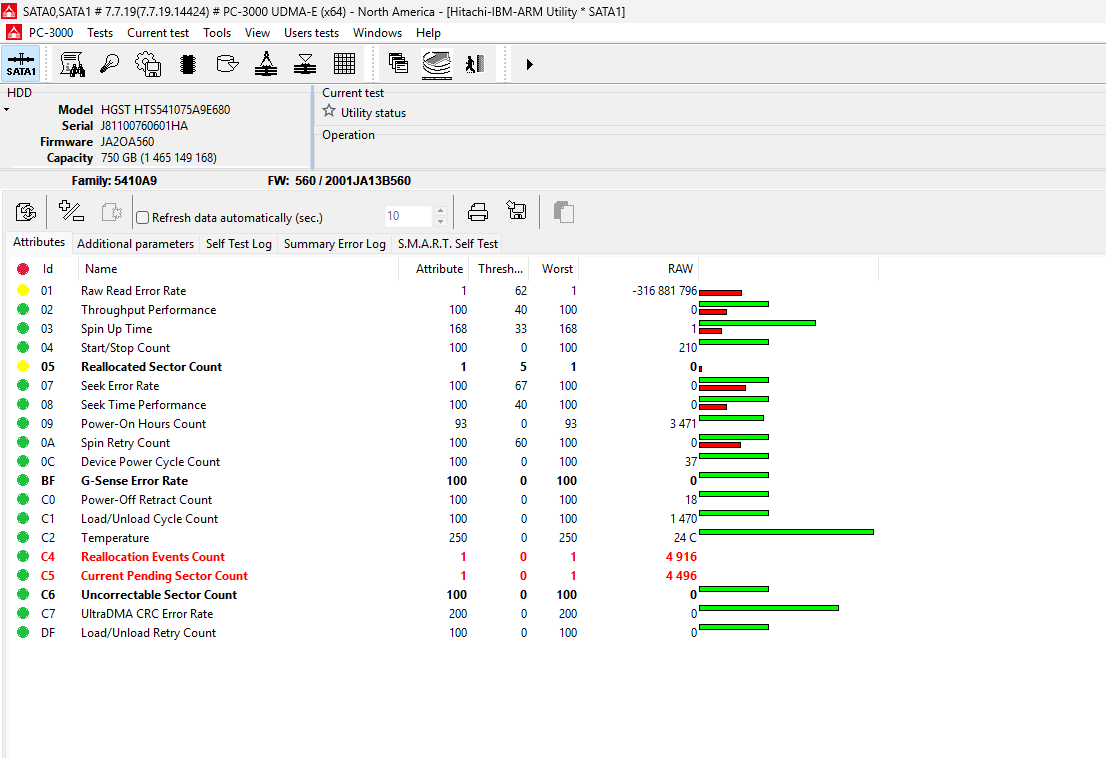
Clicking, beeping, grinding, or repeated spin-up
Unusual sounds can indicate mechanical trouble, failed calibration, motor problems, impact damage, or difficulty reading the platter surface. Disconnect the drive rather than repeatedly testing it.
The drive becomes extremely slow
Long delays when opening folders, copying files, or starting the computer can be caused by weak media and repeated read attempts. A slow drive may be spending significant effort trying to read damaged areas.
The drive disappears or disconnects
A drive that appears intermittently, disconnects during copying, or vanishes after a few minutes may have electrical, firmware, media, USB bridge, or power problems.
The computer freezes when the drive is connected
An unstable drive can make the operating system wait for responses that never arrive. If connecting one device repeatedly freezes the computer, avoid continued scanning or copying attempts.
Files become corrupted or folders stop opening
Corruption can have many causes, but new unreadable files, repeated errors, missing folders, or requests to format the drive can indicate media or file-system damage.
SMART warnings and bad-sector messages
SMART warnings can indicate that a drive has detected reliability problems. They are useful warnings, but the absence of a SMART alert does not prove that a drive is healthy.
If the files are backed up
Stop relying on the drive and replace it. Verify the backup before disposing of the failed device.
If the files are not backed up
Power the drive off and avoid repair scans, formatting, initialization, or repeated copying attempts.
If the drive is clicking, grinding, dropped, or physically damaged, do not run software scans. Software cannot repair mechanical damage and may make the drive work harder.
Why early symptoms matter
The earlier a failing hard drive is handled correctly, the better the chance of controlled imaging. Waiting until the drive no longer spins, clicks constantly, or disappears completely can reduce options and increase the complexity of the recovery.
Best first action
Stop using the drive, write down what happened, and identify the files that matter most. Bring the drive in for diagnosis before its behavior worsens.
North York data recovery lab
Hard drive showing warning signs? Preserve the chance of recovery.
Free diagnostics are available at OmniDataPlus. Bring the device in as-is, or contact the lab before attempting another power-on, scan, rebuild, or repair.